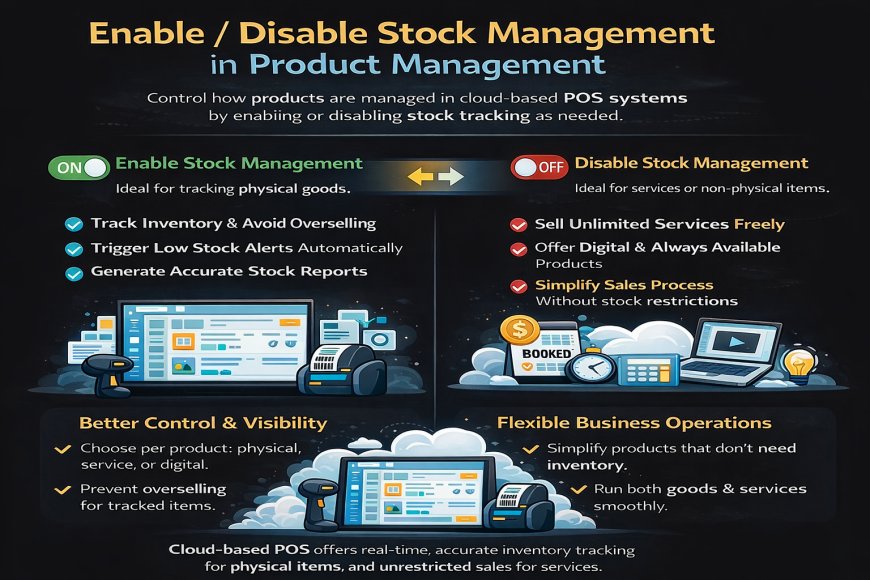
Enable and disable stock management is an important feature in product management within a cloud-based POS system. It allows businesses to decide whether a product should be tracked by quantity or not, depending on the type of item being sold.
When stock management is enabled, the POS automatically tracks inventory levels as sales, returns, and stock adjustments occur. This is ideal for physical products, as it helps prevent overselling, supports accurate stock reports, and triggers low-stock alerts when quantities run low.
When stock management is disabled, the system does not track quantities. This option is useful for services, digital items, or products that are always available. Sales can continue without stock restrictions, keeping operations simple and flexible.
By choosing to enable or disable stock management per product, businesses gain better control over inventory, reduce errors, and manage both physical goods and services efficiently within one cloud-based POS system.


 Like
1
Like
1
 Dislike
0
Dislike
0
 Love
0
Love
0
 Funny
0
Funny
0
 Angry
0
Angry
0
 Sad
0
Sad
0
 Wow
0
Wow
0